
Payroll Was Right. Aspire Was Off by $15K a Month.
Before You Trust Your Job Costs, Check the Costs Behind Them.
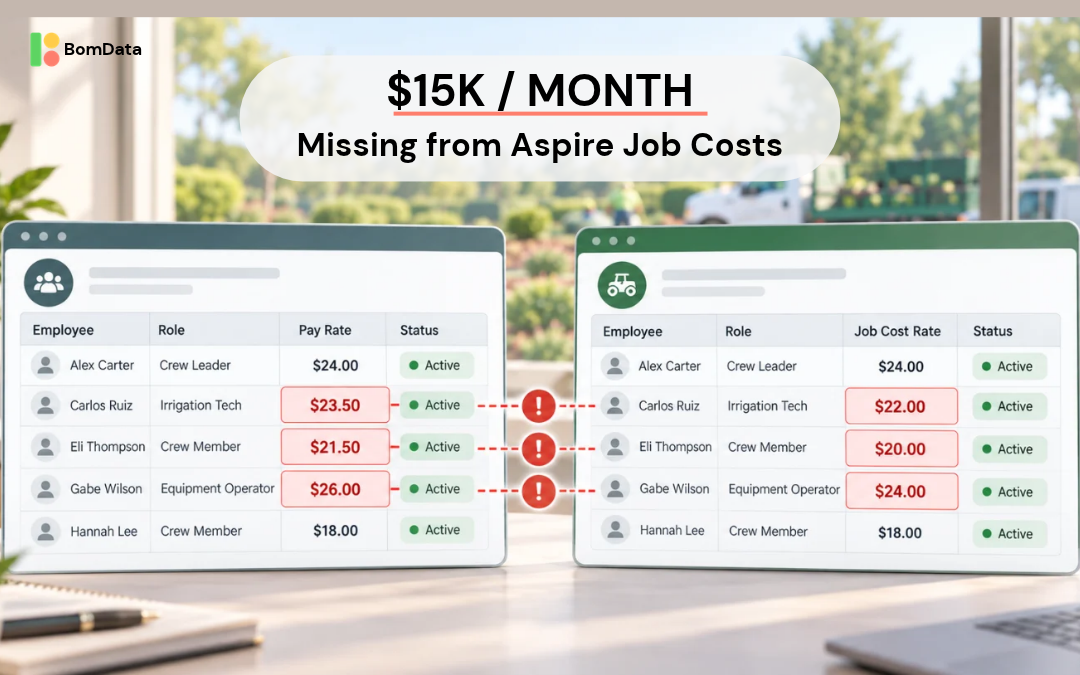
A commercial landscape company recently discovered that $15,000 a month in labor costs were missing from its Aspire job costing.
Payroll was accurate and everyone was getting paid correctly, but employee raises and other changes weren’t consistently making their way from HR into Aspire. That meant the company was relying on understated labor costs to evaluate job profitability, gross margins, and ultimately, decisions about next year’s contracts.
What one company found
The company, with more than 300 active employees, recently compared its BambooHR employee records against Aspire. In minutes, the comparison uncovered:
-
76 incorrect pay rates, nearly 1 in 4 active employees
-
21 new hires missing from Aspire
-
About 130 former employees still marked active
Most importantly, the pay rate discrepancies added up to a net understatement of roughly $15,000 per month in labor costs.
The company wasn’t aware its systems had drifted so far apart. And without comparing employee records across both platforms, there was little reason to suspect the job costing numbers were wrong.
Why this matters for your margins
When pay rates in Aspire are outdated, the problem goes well beyond messy employee records. Think about what happens when those numbers carry into renewal season: a property that looks like it hit its labor budget may have actually run over. An account manager might carry forward last year’s pricing without realizing the true cost of servicing that property. And leadership could be looking at stronger gross margins than the business actually earned.
When you’re managing dozens or hundreds of commercial properties, even relatively small discrepancies can add up. The problem isn’t just having inaccurate data in Aspire, it’s making decisions about next year’s contracts, budgets, and staffing based on it.
Three things worth checking in your Aspire data
1. Incorrect pay rates
Every raise creates an opportunity for your HR and Aspire records to get out of sync. If an employee is earning $24 an hour but Aspire still shows $21, every hour assigned to that employee is understated by $3 in job costing.
Multiply that difference by the hours worked since the raise took effect, and you can calculate the financial impact. This also helps prioritize corrections. Not every discrepancy has the same effect on your job costs.
2. Missing employees
Seasonal hiring moves quickly in commercial landscaping. When new employees are added to payroll but not properly set up in Aspire, their labor may not be captured or allocated correctly. Compare your active HR roster against Aspire to identify anyone missing, then investigate how their hours and costs are being recorded.
3. Former employees still marked active
Terminated employees who remain active in Aspire can clutter crew lists, complicate scheduling, and create confusion in employee reporting. These records may not have the same direct financial impact as incorrect pay rates, but they’re another sign that your systems are drifting apart.
How BomData made the audit simple
Running this audit manually isn’t complicated in theory. Export employee records from both systems, match people up, compare pay rates and statuses, and investigate the differences.
But with hundreds of employees, it becomes a time-consuming spreadsheet project, and when everyone is busy keeping crews moving, it’s the kind of task that gets pushed to next month.
This company took a different approach. They exported employee data from BambooHR and gave the file to Claude, which already had access to its Aspire data through the BomData connector.
BomData makes Aspire data available for analysis through Claude, so instead of building custom reports or manually comparing spreadsheets, the team could simply ask Claude to compare the records. Within minutes, it had identified the discrepancies and calculated their financial impact.
Doing it this way also helped turn the findings into a work list for HR. The team made the corrections in Aspire, then used BomData to check the updated records and confirm what had been fixed.
What could have been a lengthy manual audit became a straightforward process of finding, fixing, and verifying the errors.
Try it with your own Aspire data
You don’t need to start with a company-wide audit. Even a few targeted questions can help uncover problems that might otherwise go unnoticed. If you use separate systems for HR and Aspire, here are a few places to start:
-
Compare employee pay rates. Are the rates in Aspire consistent with your HR records? Which discrepancies have the biggest financial impact?
-
Check your employee roster. Who is active in HR but missing from Aspire? Who is terminated in HR but still active in Aspire?
-
Review labor burden. If you track burden rates in Aspire, are they still aligned with your current assumptions?
-
Validate your job costing. How much would your reported labor costs change if you applied the correct pay rates to actual hours worked?
With the BomData connector, Claude can analyze Aspire data alongside files you provide, opening up opportunities to investigate questions that would otherwise require several reports, exports, or hours of spreadsheet work.
And this approach isn’t limited to employee data. Think about other information your company maintains outside Aspire, from budgets and production targets to property records. Where might those systems have drifted apart without anyone noticing?
Before you trust your job costs, check the costs behind them
Commercial landscape companies spend a lot of time reviewing estimated versus actual hours. Are crews finishing within budget? Which properties are running over? Where do estimates need to change?
Those are important questions. But even perfectly recorded hours won’t give you accurate job costs if the pay rates behind them are wrong. This company had no reason to suspect its labor costs were wrong, but one simple comparison uncovered $15,000 a month in costs that Aspire wasn’t accounting for.
What would you find if you started asking similar questions of your Aspire data?
BomData helps commercial landscape companies get more from their Aspire data, from crew efficiency and property performance to deeper analysis through its Claude connector. Contact us to learn more.
Get STarted
Work Toward Operational Efficiency
Take the first step toward operational efficiency for your landscaping business today with BomData. Contact us today for a free demo or to get started.
©Copyright BomData 2025