
How We Built an AI Coworker for Commercial Landscaping
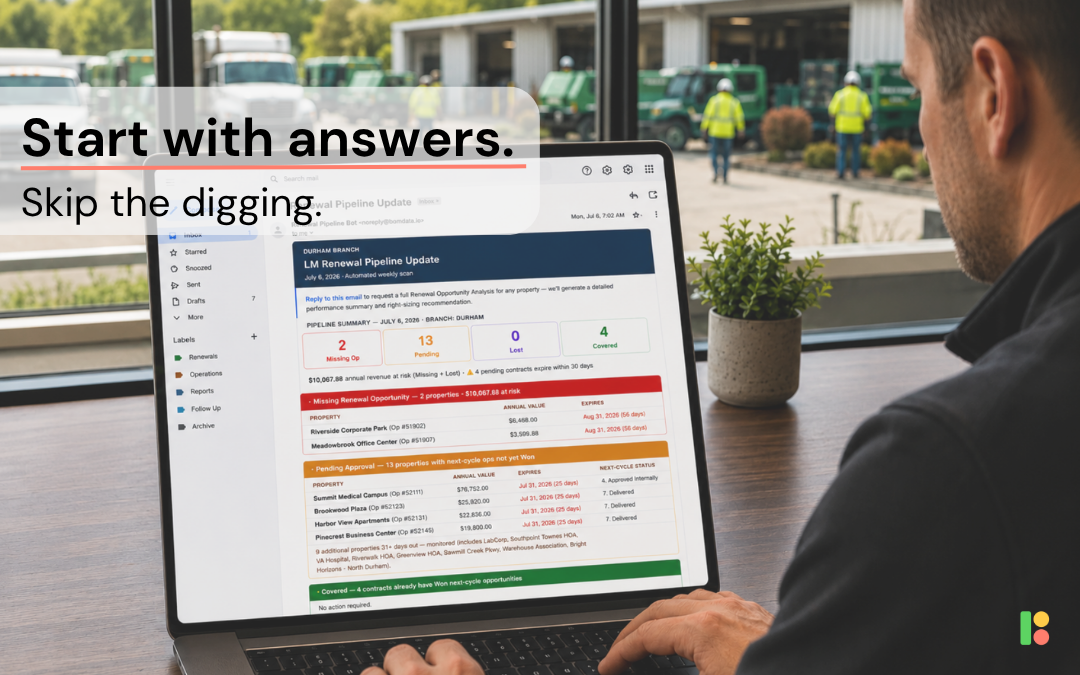
How one commercial landscaping company uses BomData and Claude Cowork to automate hours of renewal analysis every Monday, and what we learned building it.
Everyone is talking about AI. Most conversations sound something like:
“I have ChatGPT write my emails.”
“Claude summarizes my meetings.”
Those are useful (we use them ourselves), but we don’t think that’s where AI creates the biggest impact for commercial landscapers. The biggest wins come when AI takes ownership of a repeatable operational process, something your team already knows how to do well, but has to remember to do every single week. One of our customers recently built exactly that.
Every Monday morning, before the branch manager starts the day, Claude reviews every contract approaching renewal, checks whether the next year’s opportunity has been created, analyzes profitability, recommends operational adjustments, and drafts a complete email waiting in the manager’s inbox.
It takes a few minutes. No one clicks “Run.” No one remembers to pull reports. The analysis is simply there every Monday morning.
But here’s the important part: It didn’t “just happen”, it happened because someone took the time to teach AI how they think.
The Weekly Job Nobody Loves
Every commercial landscaper has recurring operational work that’s important enough to deserve attention, but repetitive enough that it often gets pushed aside. For one company, that’s renewals. They renew throughout the year, so every Monday they review contracts approaching expiration. If your company renews everything in the fall, your version might be weekly property reviews, problem jobs, Crew Mobile adoption, or enhancement opportunities instead. The workflow is different. The lessons are exactly the same.
In this example, every week someone needs to:
- Identify contracts approaching renewal.
- Verify that renewal opportunities have actually been created.
- Review estimated versus actual labor.
- Decide whether labor assumptions need adjusting.
- Decide whether pricing needs adjusting.
- Look for billing anomalies.
- Summarize everything for the branch manager.
None of these tasks are particularly difficult, they’re just repetitive. And repetitive work is exactly where AI performs best.
We Didn’t Start With AI
One thing surprised us while building this workflow: we didn’t begin by writing prompts. We began by writing an operations manual. The customer already had a detailed SOP explaining exactly how branch managers and account managers should approach renewals.
It answered questions like:
- When should a renewal opportunity be created?
- What margin targets should each division hit?
- When should labor estimates change?
- When should pricing change?
- What deserves attention, and what doesn’t?
Only after those decisions were documented did we introduce Claude. That ended up being one of the biggest lessons from the entire project. Good AI starts with good operations. If your process only exists inside your best employee’s head, AI can’t execute it consistently.
If you’ve already documented how your team makes decisions, you’re much closer than you think.
Prompt Engineering Isn’t What Most People Think
People often imagine prompt engineering as writing clever instructions. In reality, it’s closer to writing an employee handbook.
Consider the difference.
Vague instruction
Analyze renewals and flag any issues.
Sounds reasonable. But what does “an issue” actually mean?
Instead, we wrote instructions like this:
For each contract in the renewal window, calculate gross margin using OT-adjusted cost. For Landscape Maintenance and Irrigation Service divisions, multiply actual cost by 1.0556 to account for overtime burden. Seasonal Color and Aeration & Seeding use a different calculation. Target margins differ by division. If Landscape Maintenance falls within its target range, don’t flag the blended property margin simply because subcontractor divisions naturally operate at lower margins.
That’s one example paragraph from a multi-page instruction set.
It tells Claude exactly how to think, not just what to calculate.
Here’s another example.
Vague instruction
If margin is low, recommend a price increase.
Instead, the instructions say:
Step 1: Look for labor savings first. If actual labor came in below estimated labor, reduce the renewal estimate toward actual hours with a small seasonal buffer.
Only after operational improvements have been exhausted should pricing even be considered. If pricing is still required, recommend approximately a 3% increase. Never recommend more than 5%. If no increase is needed, explicitly state: “No price increase recommended.”
That single section completely changes the recommendations Claude produces. In fact, one account reviewed this week was running at a 37.2% margin, slightly below the company’s 38% target. A generic prompt might recommend increasing prices. Instead, Cowork recognized that nearly 700 estimated labor hours were unnecessary based on historical data. Its recommendation wasn’t to charge the customer more, it was to right-size the labor estimate. Projected renewal margin after adjusting labor: approximately 49%.
That’s not generic AI advice, that’s the company’s operational philosophy, written down and applied consistently.
Every Failure Became a Better Instruction
This workflow didn’t work perfectly on day one. We’ve been refining it over the last couple months. Looking back, almost every improvement came from something breaking first. One early issue was surprisingly simple: the workflow originally filtered contracts using Aspire’s Renewal Date, but it turned out that field wasn’t reliable based on manual data entry issues. The fix was changing the instructions: Use End Date instead.
Another issue was much harder to spot. Large data pulls occasionally reached BomData’s row limit. Claude didn’t throw an error, it simply analyzed incomplete data. Today, the workflow checks the returned row count before doing anything else. If exactly 500 rows come back, the known query limit, the workflow immediately flags and explains the issue, rather than risking incomplete recommendations.
One of our favorite examples happened just this week. To improve speed, Claude originally checked renewal opportunities in batches. Most of the time it worked perfectly, but occasionally it didn’t. One property had an active renewal opportunity already in progress, but the batch query missed it. Rather than accepting that occasional false positive, the customer added a second verification step. Potential warning properties now receive an individual follow-up check before appearing in the final email to reduce noise.
Sometimes AI Isn’t the Right Tool
One of the biggest architectural changes had nothing to do with prompting. Early versions asked Claude to classify every property itself. Duplicate detection, opportunity matching, renewal status, everything.
The results were inconsistent. As datasets grew, classifications started drifting. The solution wasn’t a better prompt, it was changing the architecture.
Today, Claude gathers the data and a deterministic Python script applies the business rules. Claude reads those results and explains them to the manager. AI is excellent at gathering information and communicating insights.
Claude gathers data and communicates insights; a Python script applies repeatable business rules. Knowing where to draw that line made the workflow dramatically more reliable.
Trust Was Earned, Not Assumed
When this workflow first launched, every Monday morning the report was reviewed line by line before anyone touched Send.
Today? The email is almost always sent as-is. Not because Claude magically became more intelligent, but because the workflow became more reliable. Ironically, the occasional issue that still appears is usually a data issue, not an AI issue: A duplicate property, an overlapping contract, a renewal opportunity that didn’t follow the company’s process.
In that sense, the workflow has become another quality check for Aspire itself. Instead of hiding data issues, it surfaces them before they become bigger operational problems.
Why BomData Matters
Could you build something similar without BomData? Probably. But you’d likely end up exporting spreadsheets, using browser automation, or giving AI direct access to your Aspire environment through a browser extension.
BomData provides a structured, read-only layer that Claude can query safely and reliably.
That means:
- No copying and pasting reports.
- No browser automation.
- No logging into Aspire as a user.
- No giving AI unrestricted access to your ERP.
Instead, Claude asks BomData for exactly the information it needs and builds the analysis from there.
Five Things We’d Tell Anyone Building an AI Coworker
After refining this workflow, these are the lessons we’d carry into the next project.
Start with one repeatable process.
Don’t try to automate everything. Pick one weekly task that already follows a consistent rhythm.
Document your SOP before writing prompts.
If you can’t explain the process to a new employee, AI won’t understand it either.
Expect a few weeks of iteration.
The best prompts aren’t written, they’re discovered through real-world use.
Use deterministic logic where consistency matters.
Let AI gather information and explain it. Let code enforce repeatable business rules.
Keep a human in the loop until trust is earned.
Review the outputs. Learn where the failures happen. Then improve the system instead of working around it.
This Is Just the Beginning
Renewals is one workflow example, but it certainly isn’t the only application.
The same approach could help automate:
- Weekly property reviews before margins slip.
- Crew Mobile adoption reports.
- Jobs running significantly over estimated labor.
- Enhancement opportunities hiding inside maintenance accounts.
- Branch manager Monday briefings.
- Executive scorecards across multiple branches.
Once you stop thinking about AI as something you chat with, and start thinking about it as a coworker that shows up prepared every Monday morning, the possibilities start to multiply.
At BomData, that’s the future we’re most excited about. Not because AI replaces good operators, but because it helps good operators spend less time gathering information and more time making decisions.
Get STarted
Work Toward Operational Efficiency
Take the first step toward operational efficiency for your landscaping business today with BomData. Contact us today for a free demo or to get started.
©Copyright BomData 2025